A Practical Guide to Optimizing Website Content, Metadata, Headings and Internal Links
An On-Page SEO Checklist for Websites in Indore helps website owners review the elements that influence how search engines understand their pages and how visitors experience their content. Whether you run a local service business, clinic, restaurant, consultancy or online store, on-page optimization helps make important website pages more relevant, organized and useful.
However, on-page SEO is not simply about adding a focus keyword to a page. It also involves writing useful content, creating descriptive titles, organizing headings, optimizing images and connecting related pages through internal links. Additionally, every element should support the actual purpose of the page rather than exist only to satisfy an SEO plugin.
This guide provides a practical checklist for reviewing individual website pages. It covers important on-page SEO elements and explains how businesses targeting customers in Indore can improve their website content without unnecessary keyword repetition.
What Is On-Page SEO?
On-page SEO refers to optimizing individual website pages to help search engines understand their content and help visitors find relevant information.
It includes elements that website owners can directly manage, such as:
- SEO titles and meta descriptions
- Page URLs
- Heading structure
- Main content and keyword placement
- Internal links
- Image optimization and alt text
- Content readability
- Structured data where appropriate
- Mobile page experience
For example, a service page targeting customers in Indore should clearly explain the service, use relevant headings and provide accurate business information.
Moreover, the page should answer visitors’ questions and make important information easy to find. Therefore, effective on-page SEO combines search relevance with a useful page experience.
Why an On-Page SEO Checklist Is Important for Websites in Indore
A website may contain useful information but still need improvements in its structure, metadata or content presentation.
An organized checklist helps identify these opportunities.
1. Improves Page Relevance
Relevant titles, headings and content help communicate the subject of a page.
For example, a page about website development should explain website development services rather than repeatedly mention unrelated digital marketing terms.
2. Makes Content Easier to Read
Clear headings and short paragraphs help visitors find information quickly. Additionally, organized content makes it easier to understand the relationship between different sections.
3. Supports Better Internal Navigation
Relevant internal links connect service pages, blogs and other useful resources. Consequently, visitors can discover related information without searching through the entire website.
4. Helps Identify Missing Optimization Elements
A page-by-page checklist can reveal missing titles, duplicate descriptions, unclear headings, oversized images and broken internal links.
As a result, businesses can make improvements systematically instead of relying on assumptions.
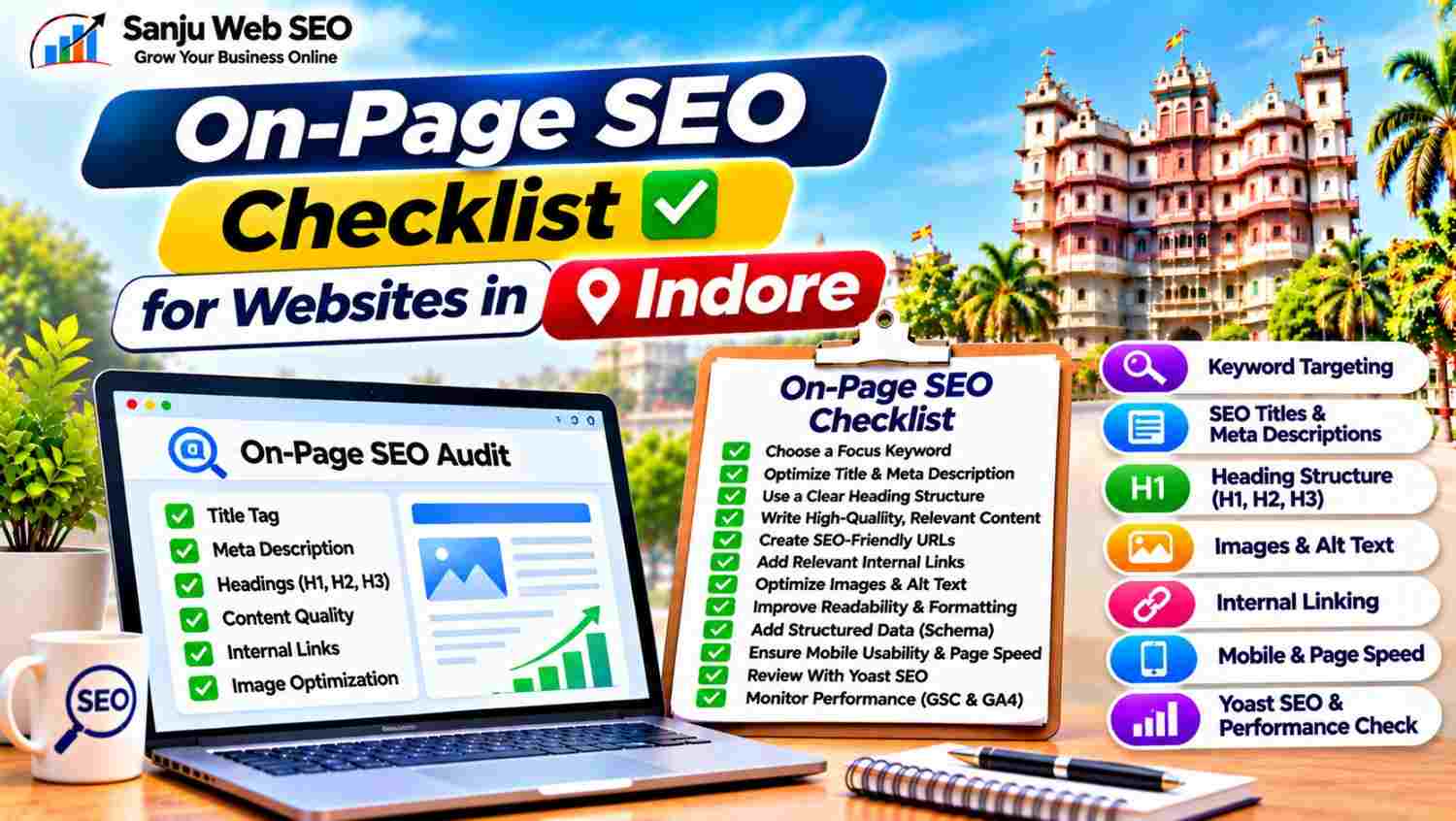
On-Page SEO Checklist for Websites in Indore: 12 Essential Checks
Use the following checklist to review important website pages one by one.
Step 1: Choose One Primary Focus Keyword
Start by identifying the main topic and search query that the page should target.
Select a primary keyword that accurately represents the page’s content and purpose.
For example, a page offering local SEO services may target a relevant service-based keyword for Indore.
Additionally, identify related terms and synonyms that customers may use when searching for the same service.
Check these points:
- Does the primary keyword match the page topic?
- Does the search intent match the content?
- Are related terms relevant to the service?
- Is another existing page targeting the same search intent?
- Can the keyword fit naturally into the content?
However, avoid selecting multiple unrelated primary keywords for one page. Instead, give each important page a clear topic and use supporting terms naturally.
Step 2: Optimize the SEO Title and Meta Description
The SEO title and meta description help communicate what visitors can expect from a page in search results.
Review these elements:
- Write a unique SEO title for every important page.
- Include the primary keyword naturally.
- Describe the actual page topic.
- Keep the title clear and readable.
- Write a relevant meta description.
- Avoid repeating the same description across multiple pages.
For example, a service page targeting Indore customers can include the service name and location in its title when appropriate.
Additionally, explain the main benefit or information available on the page through the meta description.
Remember that Google may generate a different search snippet depending on the query. Therefore, write accurate metadata rather than treating a particular display length as a guarantee.
Step 3: Create a Clear Heading Structure
Headings organize page content into meaningful sections.
Use one clear H1 heading to describe the main page topic. Next, organize major sections through H2 headings and use H3 headings for supporting topics where necessary.
Check whether:
- The H1 accurately describes the page.
- H2 headings introduce meaningful sections.
- H3 headings support the relevant H2 topic.
- Headings follow a logical order.
- Keywords and synonyms appear naturally.
- Headings are descriptive rather than generic.
For example, a service page can use headings for service details, working process, benefits and frequently asked questions.
Additionally, avoid adding the exact focus keyword to every heading. Instead, use relevant variations wherever they improve clarity.
Step 4: Improve Content Quality and Keyword Placement
Useful content is one of the most important parts of on-page optimization.
The page should answer the questions visitors have and explain the topic accurately.
Review these points:
- Include the primary keyword naturally in the introduction.
- Explain the service or subject clearly.
- Cover relevant customer questions.
- Add useful examples where appropriate.
- Avoid unnecessary repetition.
- Use short, readable paragraphs.
- Update outdated information.
- Remove content that does not serve the page purpose.
For example, a local service page should explain the services offered, the actual service coverage and how customers can make an enquiry.
Moreover, review similar pages to identify keyword cannibalization. If two pages serve the same purpose, consider whether their content and search intent need to be differentiated.
Step 5: Write Descriptive and SEO-Friendly URLs
A URL should clearly communicate the subject of its page.
For example:
example.com/on-page-seo-services/
A useful URL is generally short, readable and relevant to the content.
Check whether:
- The URL describes the page topic.
- Unnecessary words have been avoided.
- The URL uses a consistent format.
- Existing URLs are not changed without a valid reason.
- Redirects are implemented when URLs must change.
Additionally, use hyphens to separate words and avoid confusing URL structures.
However, do not change an established URL simply to include another keyword. Consider existing traffic, links and indexing before making URL changes.
Step 6: Add Relevant Internal Links
Internal links connect related pages within your website.
For example, an educational article about local optimization can link to your Local SEO Services in Indore page when the link provides useful additional information.
Review these elements:
- Links to important service pages
- Links from relevant blogs
- Descriptive anchor text
- Broken internal links
- Unnecessary redirect chains
- Links pointing to outdated pages
Additionally, check whether important pages are accessible through your website navigation and relevant supporting content.
However, avoid adding links only to increase their number. Every link should help visitors discover related information or understand the topic better.
Step 7: Optimize Images and Alt Text
Images support page content and can make information easier to understand. However, large image files may affect loading performance.
Review these elements:
- Descriptive image file names
- Relevant alt text
- Appropriate image dimensions
- Compressed image files
- Suitable formats such as WebP or AVIF
- Responsive image delivery
- Lazy loading where appropriate
For example, an image explaining an SEO audit should have a descriptive file name related to its actual subject.
Additionally, write alt text that accurately describes meaningful image content. Avoid inserting the same focus keyword into every image description.
Step 8: Check Content Readability and Page Formatting
Visitors should be able to read and understand your content without unnecessary effort.
Therefore, review:
- Paragraph length
- Sentence clarity
- Spelling and grammar
- Bullet points where useful
- Consistent formatting
- Readable font sizes
- Appropriate spacing
- Clear section introductions
Additionally, use transition words naturally to connect related ideas and make explanations flow smoothly.
However, do not add unnecessary sentences merely to increase an SEO readability score. The main objective is to communicate useful information clearly.
Step 9: Review External Links and References
External links can direct visitors towards useful resources, official documentation and relevant references.
For example, a page explaining a Google service may link to its official documentation when that helps readers understand the subject.
Check whether external links:
- Lead to relevant destinations
- Open the correct pages
- Avoid broken URLs
- Support the surrounding information
- Use appropriate link attributes where necessary
Furthermore, review external links periodically because websites can remove or change their pages.
Do not add unrelated external links simply to increase the number of outgoing links.
Step 10: Add Structured Data Where Appropriate
Structured data provides search engines with additional information about page content.
Depending on the page, suitable schema types may include:
- Organization
- LocalBusiness
- Article
- Product
- BreadcrumbList
- WebSite
Additionally, verify that structured data accurately represents the visible content.
Use Google Rich Results Test and Schema.org Validator to check the implementation.
However, avoid adding irrelevant schema or duplicating markup already generated by an SEO plugin. Valid structured data also does not guarantee rich results or higher rankings.
Step 11: Check Mobile Usability and Page Experience
A well-optimized page should work properly across different devices.
Review whether:
- The layout adjusts to mobile screens.
- Text remains readable.
- Buttons are easy to use.
- Images display correctly.
- Navigation works properly.
- Forms are simple to complete.
- Important contact information is accessible.
Additionally, check page speed and Core Web Vitals using suitable tools such as Google PageSpeed Insights.
Prioritize improvements that make the page easier to use. A high tool score alone does not guarantee a good visitor experience.
Step 12: Review Yoast SEO and Monitor Page Performance
SEO plugins such as Yoast SEO can help review important on-page elements.
Before publishing, check:
- Focus keyphrase
- SEO title
- Meta description
- Slug
- Keyphrase placement
- Keyphrase in headings
- Internal links
- Image alt text
- Readability indicators
However, treat plugin recommendations as guidance rather than absolute ranking rules.
After publishing, use Google Search Console to review search queries, clicks, impressions and indexing information. Meanwhile, Google Analytics 4 can help you understand page activity and configured key events.
Consequently, you can identify pages that need better content, improved metadata or a clearer enquiry journey.
Common On-Page SEO Mistakes Websites in Indore Should Avoid
Even a well-written page can have optimization problems when basic on-page elements are ignored.
Avoid these common mistakes:
- Keyword stuffing: Use the primary keyword naturally instead of repeating it unnecessarily.
- Duplicate SEO titles: Write unique titles for individual pages.
- Missing meta descriptions: Provide useful descriptions for important pages.
- Unclear headings: Organize content with meaningful H1, H2 and H3 headings.
- Copied content: Create original information that reflects your actual services.
- Broken internal links: Review links and update incorrect destinations.
- Missing image alt text: Describe meaningful images accurately.
- Unnecessary URL changes: Protect established URLs and use suitable redirects when required.
- Ignoring mobile usability: Test the complete page experience on smartphones.
- Overlooking performance data: Review actual search and website activity after publishing.
By avoiding these mistakes, businesses can maintain more useful and organized website pages.
How Sanju Web SEO Approaches On-Page SEO in Indore
At Sanju Web SEO, on-page optimization begins with understanding the purpose of each page, its target audience and relevant search intent.
The process can include:
- Reviewing primary and secondary keywords
- Optimizing SEO titles and meta descriptions
- Improving heading structure
- Reviewing page content and readability
- Checking URL structure
- Adding relevant internal links
- Optimizing images and alt text
- Reviewing structured data
- Checking mobile usability
- Monitoring page performance
Furthermore, existing website pages should be reviewed before creating additional content. This helps identify overlapping topics and unnecessary keyword targeting.
The objective is to make individual pages more useful, understandable and relevant to the people searching for the services or information they provide.
You can also connect with Sanju Web SEO on LinkedIn for practical SEO insights, on-page optimization guidance and digital marketing updates.
Conclusion: On-Page SEO Checklist for Websites in Indore
On-page SEO helps businesses improve the structure, relevance and usability of individual website pages.
However, successful optimization requires more than adding keywords to titles and headings. Businesses should review content quality, metadata, URLs, internal links, images, structured data and mobile experience together.
By following this On-Page SEO Checklist for Websites in Indore, companies can create a consistent page optimization process and identify improvements that support their website’s search visibility and visitor experience.
If you need help optimizing your website pages and improving your search presence, visit Sanju Web SEO or call +91 9302110432 to discuss your requirements. You can also connect with us on LinkedIn for more SEO insights, practical on-page optimization advice, website updates and strategies to strengthen your business visibility online.
FAQ’s:-
Q1. What Is an On-Page SEO Checklist for Websites in Indore?
An On-Page SEO Checklist for Websites in Indore is a structured list of checks used to review individual website pages. It includes titles, meta descriptions, headings, content, URLs, images and internal links. Additionally, it helps businesses identify missing optimization elements.
Q2. Why Is an On-Page SEO Checklist Important for Websites in Indore?
An on-page checklist helps businesses review whether their website content is relevant, organized and easy to understand. Moreover, it helps identify missing metadata, unclear headings and broken links. As a result, businesses can prioritize useful page improvements.
Q3. How Do I Choose Keywords for an On-Page SEO Checklist for Websites in Indore?
Start by identifying the main topic and purpose of each page. Next, research relevant search terms and understand their intent. Additionally, review related keywords and existing Search Console data. Finally, select terms that accurately describe the page content.
Q4. What Should I Check in SEO Titles and Meta Descriptions?
Review whether each important page has a unique, descriptive SEO title and meta description. Additionally, include relevant keywords naturally and accurately describe the page. However, avoid misleading descriptions or unnecessary keyword repetition.
Q5. How Many H1 Headings Should a Website Page Have?
A clear page structure generally uses one primary H1 heading to describe the main topic. Next, use H2 and H3 headings to organize supporting sections. However, headings should follow a logical structure and help readers understand the content.
Q6. Does an On-Page SEO Checklist for Websites in Indore Include Image Optimization?
Yes, image optimization is an important part of on-page SEO. It includes suitable file formats, image compression, descriptive file names and relevant alt text. Additionally, responsive image delivery can help improve the page experience.
Q7. Why Are Internal Links Important for On-Page SEO?
Internal links connect related pages and help visitors discover useful information. Moreover, they provide navigation paths between blogs, services and other website resources. Therefore, use descriptive anchor text and link only to relevant destinations.
Q8. Can an On-Page SEO Checklist for Websites in Indore Improve Google Rankings?
An on-page checklist can help identify optimization opportunities and improve page relevance. However, following a checklist does not guarantee higher rankings. Search performance also depends on content quality, competition, technical factors and other ranking considerations.
Q9. How Often Should I Review My Website’s On-Page SEO?
Review important pages whenever their content, services or business information changes. Additionally, conduct periodic checks to identify outdated information, broken links and missing optimization elements. For example, a major website redesign should be followed by a fresh on-page review.
Q10. Can Sanju Web SEO Help With an On-Page SEO Checklist for Websites in Indore?
Yes, Sanju Web SEO provides website optimization support that can include keyword research, metadata improvements, heading structure, content reviews, internal linking and image optimization. Additionally, businesses can receive guidance on monitoring page performance and identifying further optimization opportunities.